Get paid on Net 30 without chasing
Shopify lets your trade buyers order now and pay later. Terms Due makes sure they do pay: credit limits, checkout holds for overdue accounts, reminders by email and text, and collection from the buyer's saved card on the due date.
Works with native Shopify B2B payment terms on Basic, Grow, Advanced and Plus.
Statement
Harbour and Pine Trading
Net 30
Limit $25,000
Balance owed
$40,120.00
| #1031 | 14 Jul | Paid | $6,200.00 |
| #1038 | 29 Jul | 68 days late | $12,480.00 |
| #1044 | 18 Aug | 34 days late | $9,960.00 |
| #1047 | 12 Sep | 9 days late | $8,420.00 |
| #1052 | 3 Oct | Not yet due | $9,260.00 |
On hold
30%
Of payments to small firms arrive late
FSB, Time to Act
50,000
UK businesses the FSB estimates close each year because of late payment
FSB, Time to Act
Every plan
Shopify B2B payment terms have been on Basic, Grow and Advanced since April 2026
0
Checks Shopify makes against a credit limit at checkout, on its own
Net terms came to every Shopify plan. Collections did not.
Since April 2026, merchants on Basic, Grow and Advanced can run wholesale with company profiles, catalogs, vaulted cards and payment terms such as Net 30. That puts trade credit in reach of far more stores.
What Shopify does not do is enforce it. An overdue invoice does not stop the buyer from placing the next order, there is no check against a credit limit before checkout, and there is no aging report showing who owes what. The unpaid invoice sits there until someone on your team chases it.
Terms Due is the credit control layer that sits on top: it knows every buyer's limit and balance, blocks new orders when an account goes too far, and chases payment for you. Read the full picture in our guide to Shopify B2B net terms.
What Terms Due does
Credit limits
Set a limit per company. Terms Due checks the open balance plus the new order before the buyer can check out.
Read moreCredit holds
Overdue past your grace period or over the limit? Checkout is blocked with a clear message and a link to pay.
Read moreDue-date collection
Charge the buyer's saved card automatically on the due date, with a heads-up email a few days before.
Read moreEmail and text reminders
Polite before the due date, firmer after it. Texts reach the buyer's phone, not a shared inbox.
Read moreAging report
Every open invoice in current, 1-30, 31-60, 61-90 and 90+ day buckets, per buyer and in total.
Read moreStatements and pay-now page
Monthly statements for every buyer and one page where they can see and pay everything they owe.
Read moreSee it in the app
Terms Due lives inside your Shopify admin. These are the screens you will use.
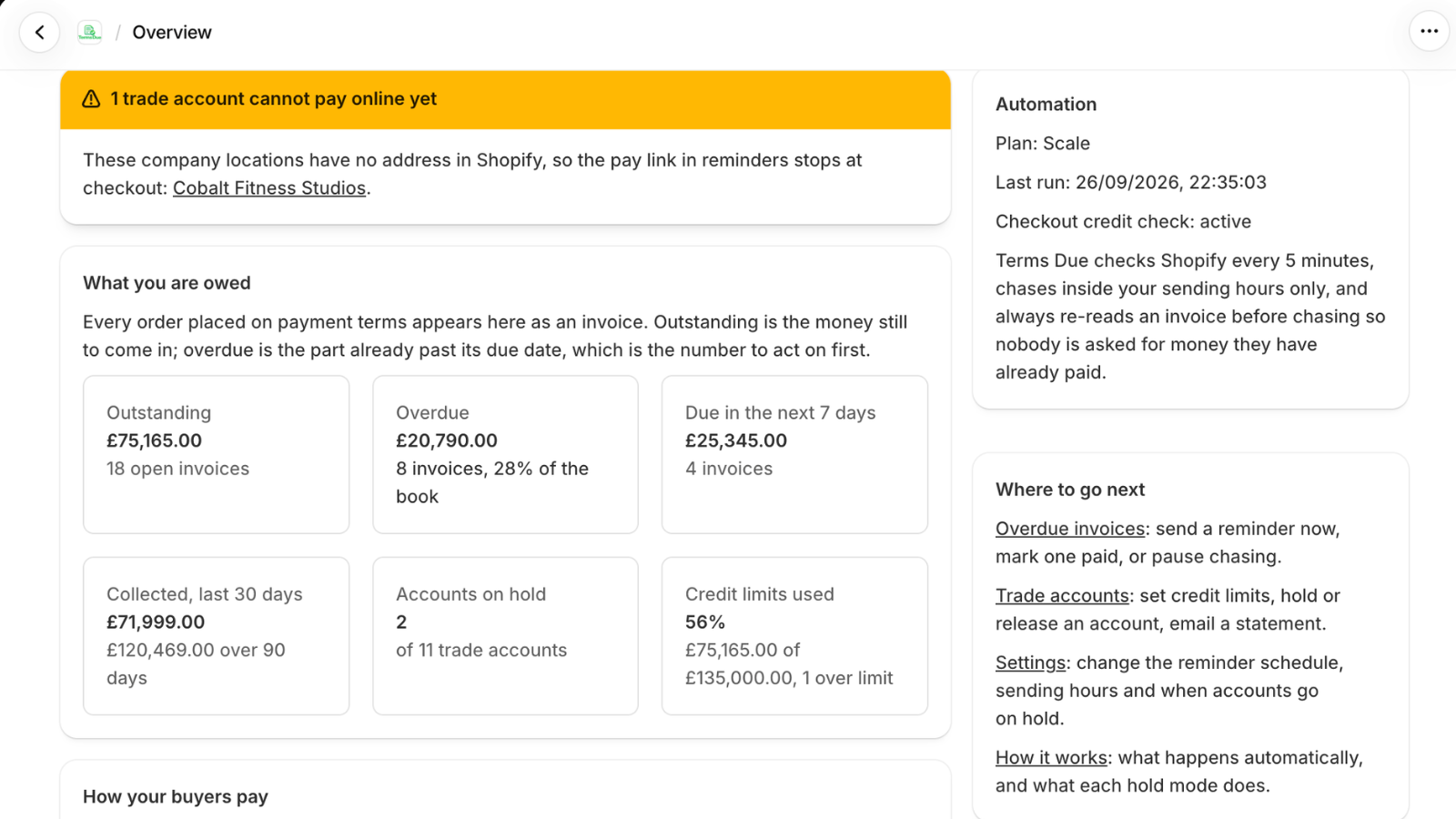
What you are owed, at a glance
Outstanding, overdue and due this week, what came in over the last 30 days, who is on hold and how much of your credit limits is in use. One screen, live from Shopify, with a warning if an account cannot pay online yet.
What you see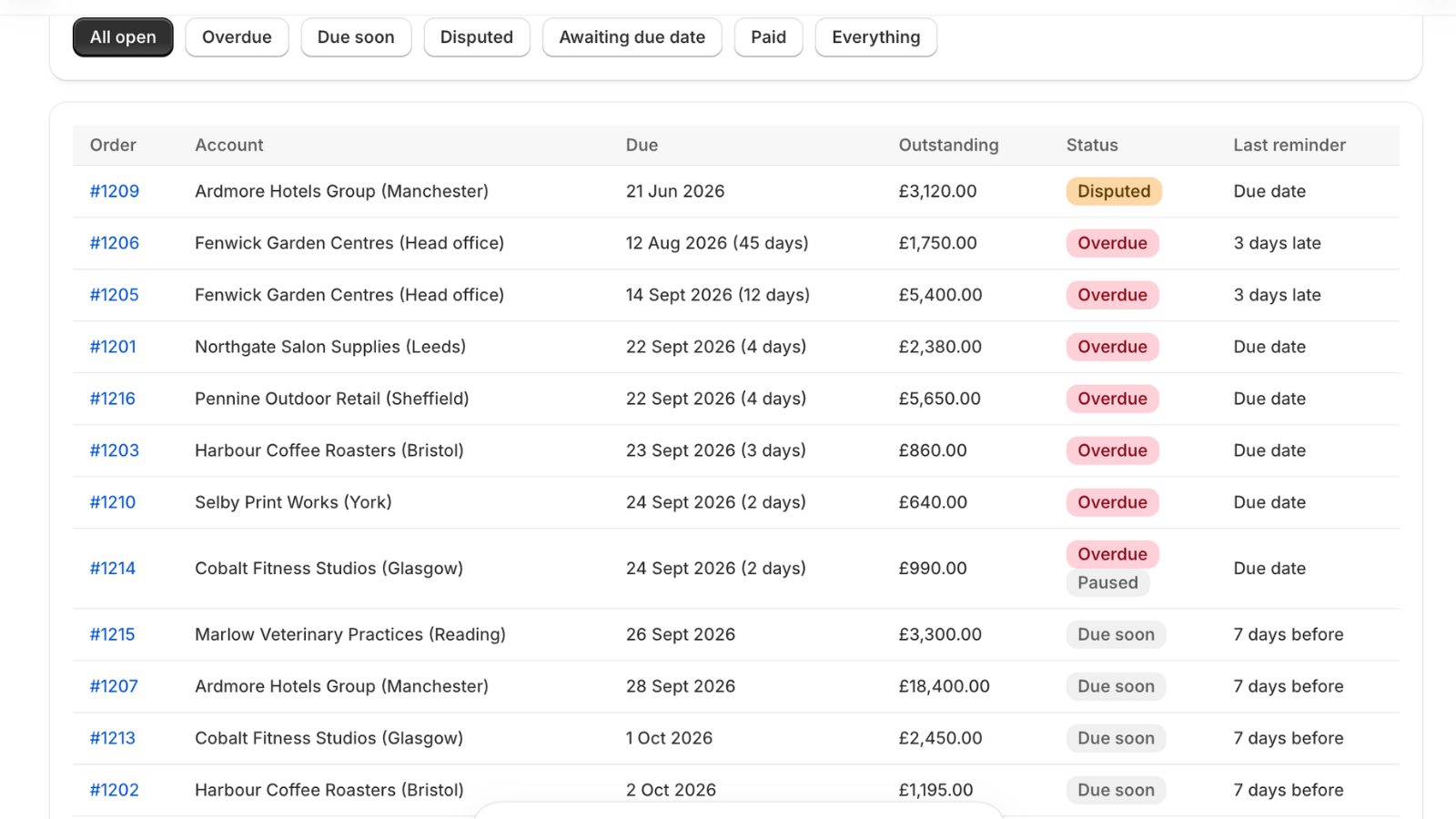
Every invoice on terms, with its status
Filter to overdue, due soon, disputed or awaiting a due date. Each row shows how late it is, what is outstanding and which reminder went out last, so you can see who has been chased and who needs a call.
How reminders work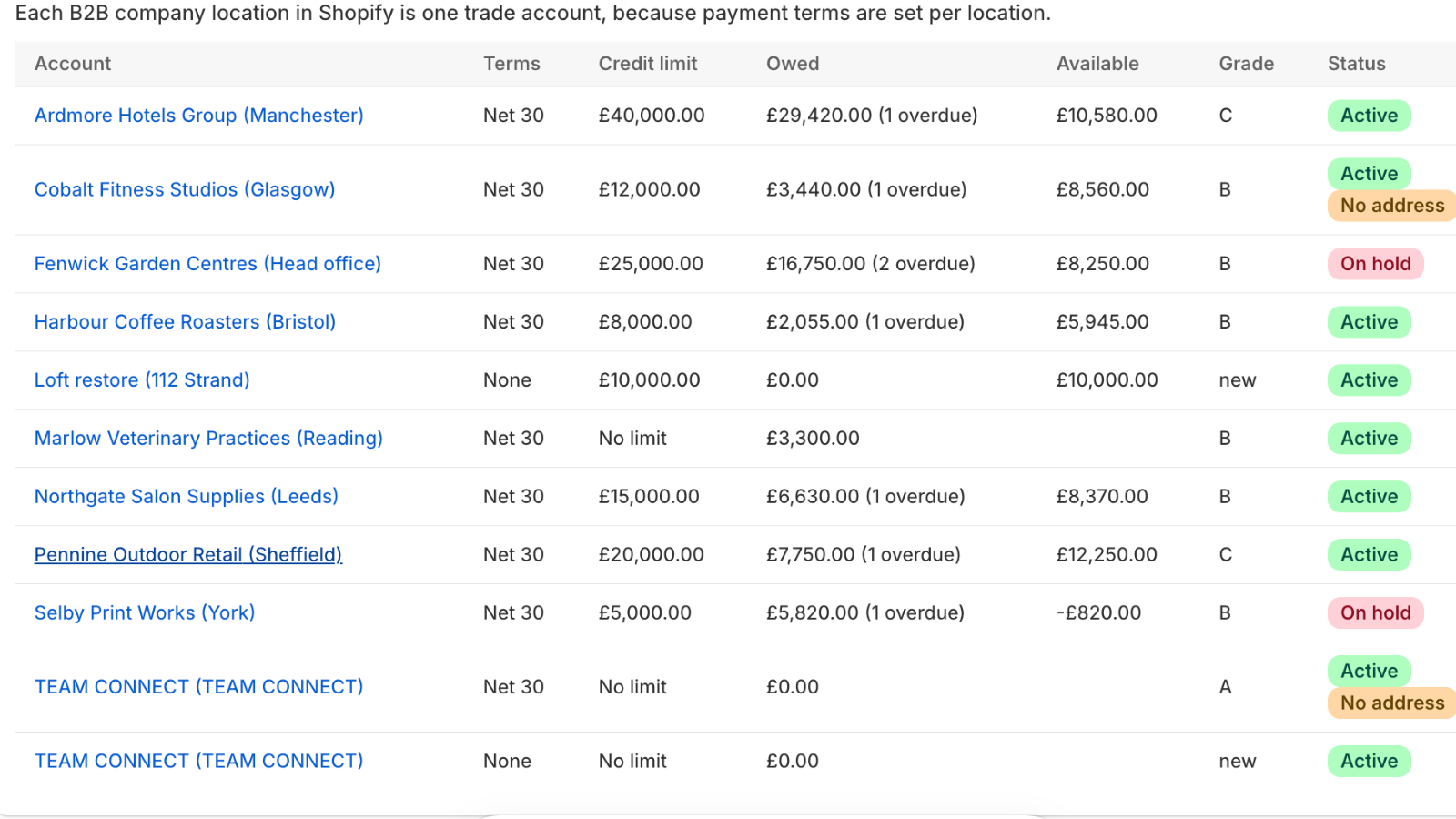
Limits and holds per trade account
Each Shopify company location is an account with its terms, limit, what it owes, what it has left and a grade from its payment history. Holds show the moment they apply and lift the moment the balance is paid.
Credit limits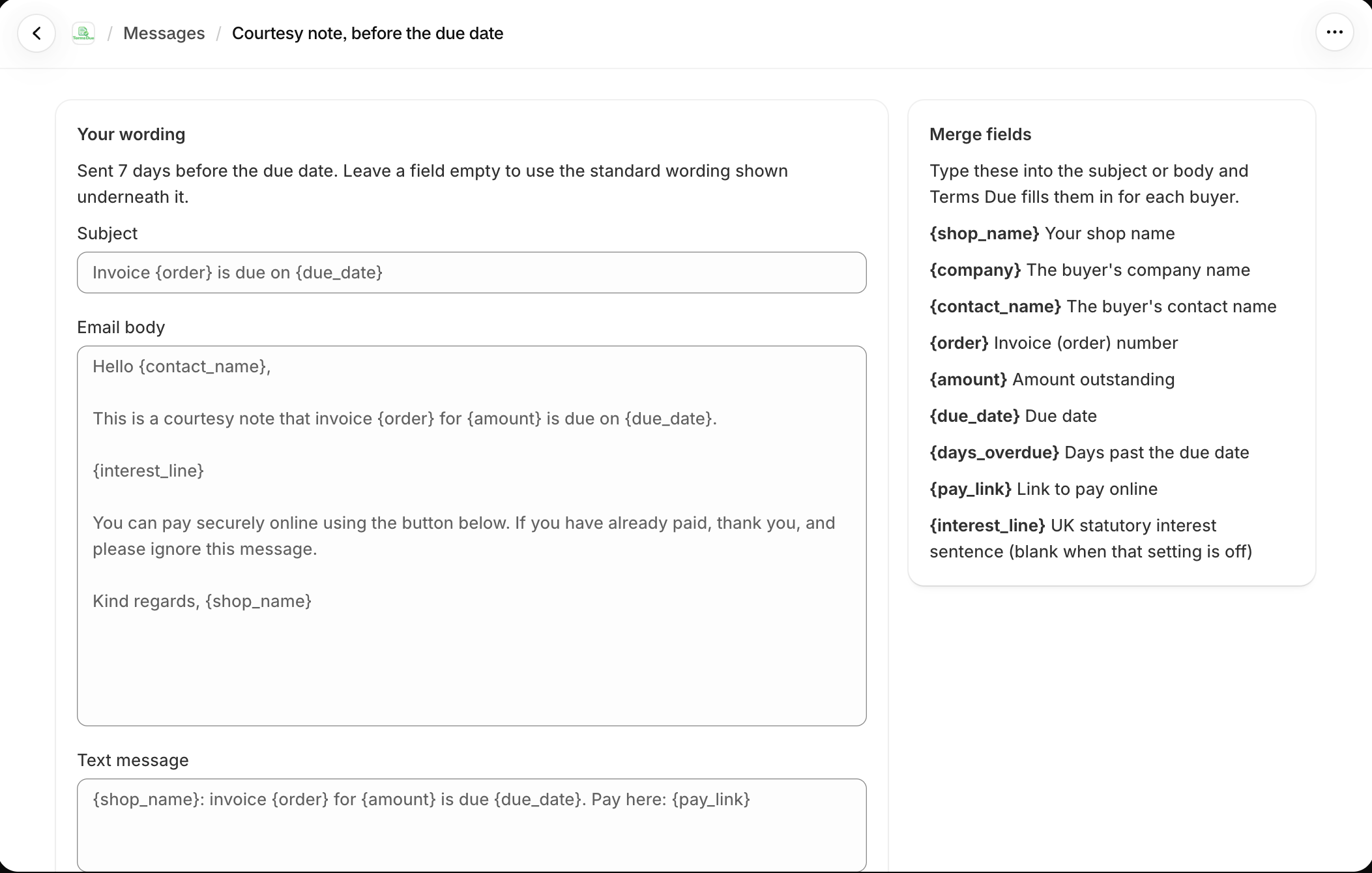
Reminders in your words
Every step has an editable subject, email and text with merge fields for the buyer, invoice, amount, due date and pay link. Leave a field empty to keep the standard wording, preview it with one of your real invoices and send yourself a test.
Email and text remindersA late invoice, with and without Terms Due
Shopify alone
- The order's status turns to overdue. Nobody is told.
- The buyer places another order on the same terms.
- Someone notices a fortnight later and clicks Send reminder.
- Stopping the buyer means editing their company by hand.
- The total owed lives in a spreadsheet someone rebuilt last month.
With Terms Due
- The buyer had a heads-up five days before and a text on the day.
- At 7 days an overdue notice goes out with the invoice attached.
- At 14 days the account is on hold and the next order stops at checkout.
- Payment lifts the hold in minutes and restores the terms.
- You read it all in Monday's email.
Reminders that reach a person
Wholesale invoices go to accounts inboxes that nobody reads on time. Terms Due sends a text to the buyer's phone with the amount, the due date and a one-tap pay link.
You choose the schedule: a few days before, on the day, and every week after. Each message changes tone as the invoice ages, and tells the buyer when new orders are paused. Edit the wording, add your logo, send yourself a test. See payment reminders.
Harbour Supply Co
Hi Sam, invoice 1047 for $8,420.00 was due on 12 Sep. You can pay in one tap here: termsdue.com/p/8KD2
Reminder: invoice 1047 is now 14 days overdue. New orders are paused until it is paid. Pay here: termsdue.com/p/8KD2
Paying this afternoon, sorry
Know who owes what, today
The aging report sorts every open invoice by how late it is. You see the total at risk in each bucket and the buyers who make it up, without exporting orders to a spreadsheet.
Get it on screen, as a CSV, or emailed to you every Monday. See aging report.
| Buyer | Current | 1-30 | 31-60 | 61-90 | 90+ |
|---|---|---|---|---|---|
| Harbour and Pine | $9,260 | $8,420 | $9,960 | $12,480 | |
| Northgate Deli Co | $3,150 | ||||
| Lune Street Salons | $1,880 | $2,240 | |||
| Copper Kettle Cafes | $4,610 | ||||
| Total | $14,290 | $10,660 | $9,960 | $12,480 | $4,610 |
The life of an invoice on Terms Due
With the default schedule and a 14-day grace period.
- Checkout
Limit checked
Open balance plus this order compared with the company's limit. Over it, or on hold, and checkout stops with a message.
- Day -5
Heads-up
Email with the amount, the due date and a pay link. Most late payments are forgotten payments; this prevents most of them.
- Day 0
Collect or remind
The saved card is charged, or a due-today email and text go out.
- Day 7
Overdue notice
Email and text with the invoice attached and the date orders will pause.
- Day 14
Hold
New orders on terms stop at checkout until the balance is paid.
- Paid
Release
Balance updated, reminders stopped, hold lifted, terms restored. Automatically.
Worked example
What it looks like with forty accounts
A skincare brand has forty stockists on Net 30 averaging $1,800 a month each. In a slow month, six pay late. Two of them try to reorder while late and are stopped at checkout; both pay the same afternoon. The other four pay by the day-7 text. At month end $2,100 is late across two accounts, both under their limits, and nobody on the brand's team has sent a single message by hand.
The owner's involvement: a five-minute Monday email, and one phone call she chose to make.
| Trade accounts | 40 |
|---|---|
| Late in the month | 6 |
| Stopped at checkout | 2 |
| Reminders sent by hand | 0 |
| Late at month end | $2,100 |
Selling to UK trade buyers?
Under the Late Payment of Commercial Debts (Interest) Act 1998 you can claim statutory interest and a fixed compensation sum on late business invoices. Terms Due works both out for you and adds them to the buyer's statement. See UK late payment interest.
Set up in an afternoon
Install and connect
Terms Due reads your B2B companies, locations, payment terms and open orders from Shopify. The aging report is populated within minutes.
Set limits and rules
Give each company a credit limit and choose when to hold: over the limit, overdue past a grace period, or both.
Turn on reminders and collection
Pick your reminder schedule, edit the wording if you like, and choose whether to charge saved cards on the due date.
Let it run
Terms Due holds, reminds and collects in the background. You check the aging report when you want to, and read the Monday email.
Built for the way your trade buyers pay
Different trades, different buyers, the same problem. See how merchants in your trade set it up.
Simple pricing, billed through Shopify
Four plans by the number of trade accounts you sell to: free for up to three, then from $49 a month with a 14-day free trial, billed on your Shopify invoice. No setup fee, no contract, and nothing to export when you start. See pricing.
Questions
Does Terms Due replace Shopify B2B?
No. You keep using Shopify's own companies, catalogs and payment terms. Terms Due adds credit limits, holds, reminders, collection and reporting on top.
Which Shopify plans does it work on?
Any plan with native B2B: Basic, Grow, Advanced and Plus. Payment terms have been available on all of them since April 2026.
Can it block a buyer who owes too much?
Yes. A checkout rule stops B2B orders from a company that is over its credit limit or overdue past your grace period, and tells the buyer how to clear the balance.
Do buyers need an account with Terms Due?
No. Buyers get emails and texts from your store name and pay on a page that shows your branding.
How much does it cost?
It is free for up to three trade accounts. Paid plans start at $49 a month with a 14-day free trial, billed through Shopify. See pricing.
How long does it take to set up?
Most merchants are running within an afternoon: install, set a default limit, adjust a few companies, turn on the schedule.
Does it work for retail customers too?
Terms Due only acts on B2B companies ordering on payment terms. Retail checkout and customers paying in full are untouched.
Stop chasing wholesale invoices by hand
Install Terms Due, set a credit limit for each buyer and let the app hold, remind and collect.
Install on Shopify