How Terms Due works
From the moment a trade buyer places an order on terms to the moment the money lands, here is what Terms Due does at each stage.
The life of an invoice
The buyer places an order on terms
Before checkout completes, Terms Due adds the order to the company's open balance and compares it with the credit limit. If it would go over, or the company is on hold, checkout stops with a message telling the buyer why.
The order becomes an invoice
When the order is placed on Net 30 (or whatever terms you set), Terms Due records the amount, the due date and the buyer contact who should hear about it.
A heads-up before the due date
A few days before the invoice falls due, the buyer gets an email with a pay-now link. If you collect from saved cards, the email says when the card will be charged.
Due date: collect or remind
With collection turned on, Terms Due charges the buyer's saved card for the invoice amount. If there is no card, or the charge fails, the buyer gets a reminder instead.
Overdue: escalate
Reminders continue on your schedule by email and text, getting firmer each time. After your grace period the company goes on credit hold, so new orders wait until the balance is paid.
Paid: release
When the invoice is paid, whether by card, bank transfer marked in Shopify, or the pay-now page, Terms Due updates the balance and lifts the hold automatically.
Who does what
Shopify
- Companies, locations and contacts.
- Catalogs, price lists and volume pricing.
- Payment terms and the due date on each order.
- Vaulting the buyer's card at checkout.
- The order itself, and the record of payment on it.
Terms Due
- The credit limit and live balance for every company.
- The checkout rule that holds over-limit and overdue accounts.
- The reminder schedule by email and text, with your wording.
- Charging the saved card on the due date.
- Statements, the pay-now page, the aging report and the Monday email.
What happens at checkout
Terms Due installs a checkout validation rule in your store, the same mechanism Shopify uses for its own checkout rules. When a B2B buyer chooses to pay on terms, the rule looks up their company in Terms Due: is it on hold, and would this order take it over its limit? If either is true, checkout shows a message with the amount owed and a link to pay, and the order is not created.
The check happens inside Shopify's checkout, so it applies to every contact at the company, on every device, whether or not they have read a reminder. Buyers paying in full by card are never affected, because nothing will be owed. Orders you create yourself in admin are flagged in Terms Due rather than blocked, so you keep the final say.
What you control
Limits per company
Set a default limit for new companies and override it for each one. Zero means pay upfront only.
Hold rules
Hold when over the limit, when any invoice is overdue by more than a set number of days, or both.
Reminder schedule
Choose which days before and after the due date to send, and whether each step goes by email, text or both.
Wording and branding
Edit every email and text, add your logo and a footer line, and preview against a real invoice.
Collection
Turn due-date charging on for everyone, off for everyone, or set it per company.
Interest and exceptions
For UK buyers, add statutory interest and compensation. Pause reminders for a buyer who has agreed a date, or release a hold for one order.
The settings behind it
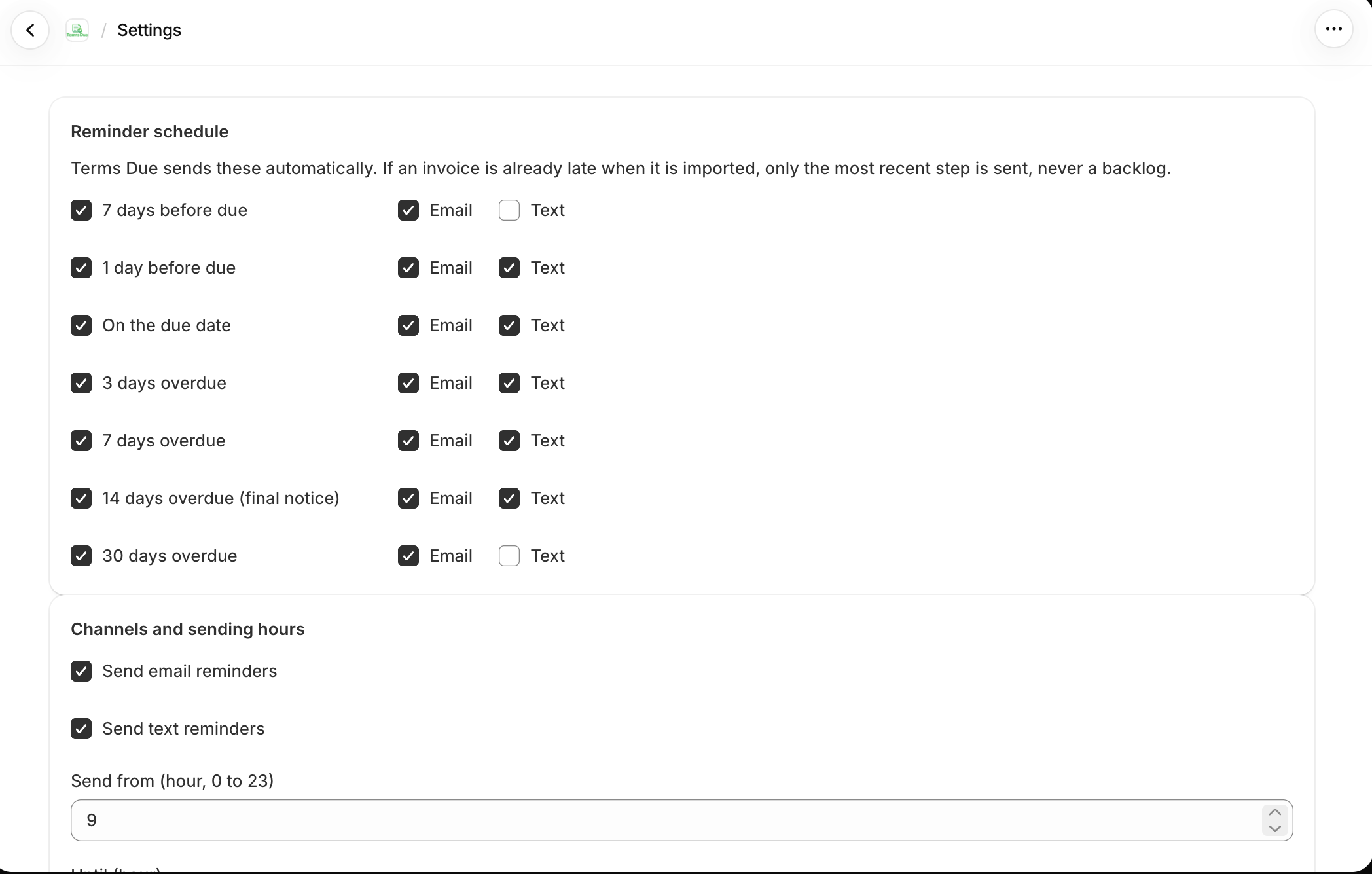
Pick the days and the channels
Seven steps from a week before the due date to 30 days after it. Tick which ones run and whether each goes by email, text or both. If an invoice is already late when it is imported, only the latest step is sent, never a backlog.
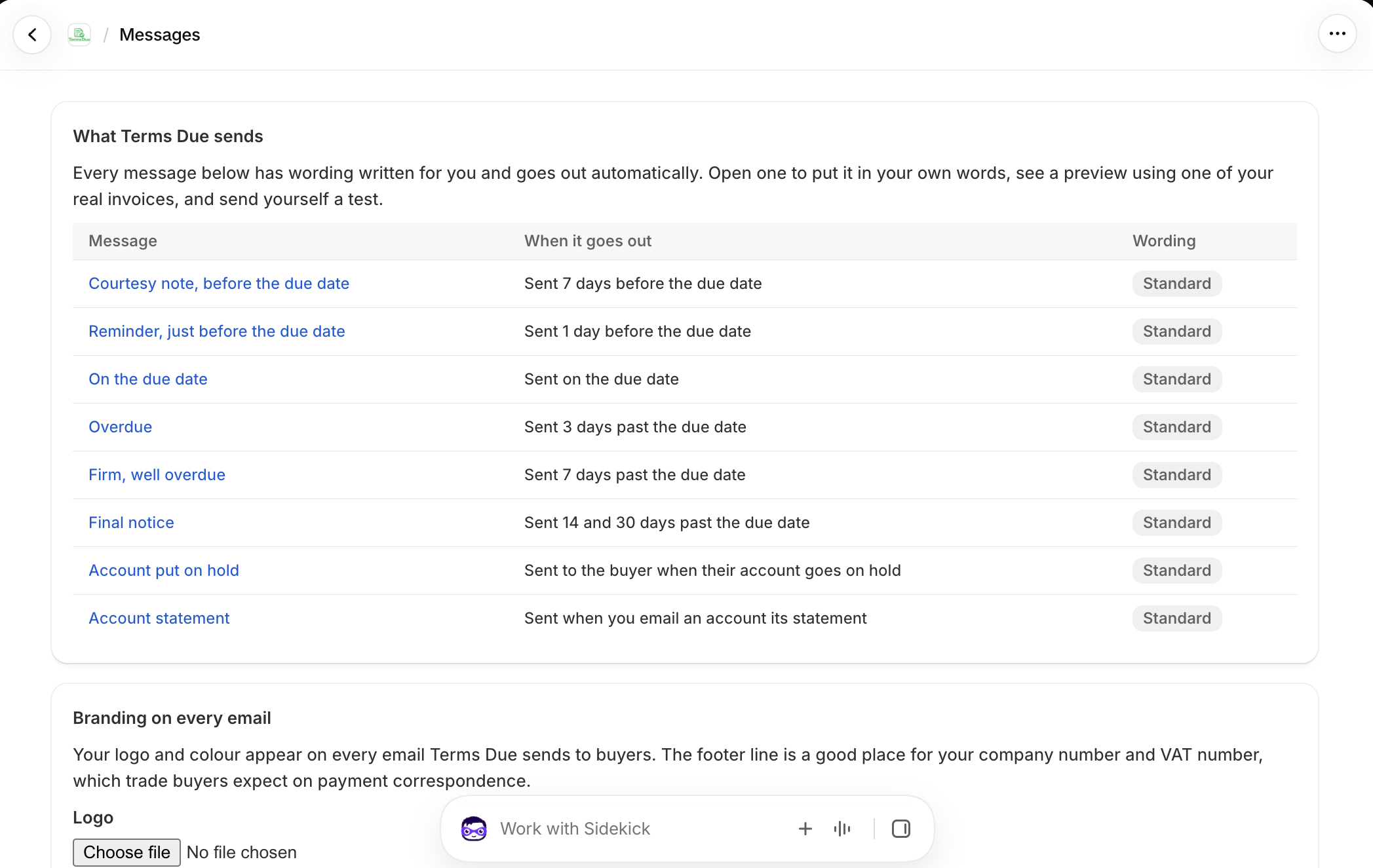
Eight messages, all written for you
Courtesy note, due-date reminder, overdue, firm, final notice, account on hold and the statement email. Each shows when it goes out and whether you have changed the wording. Your logo, colour and a footer line for your company and VAT numbers go on every one.
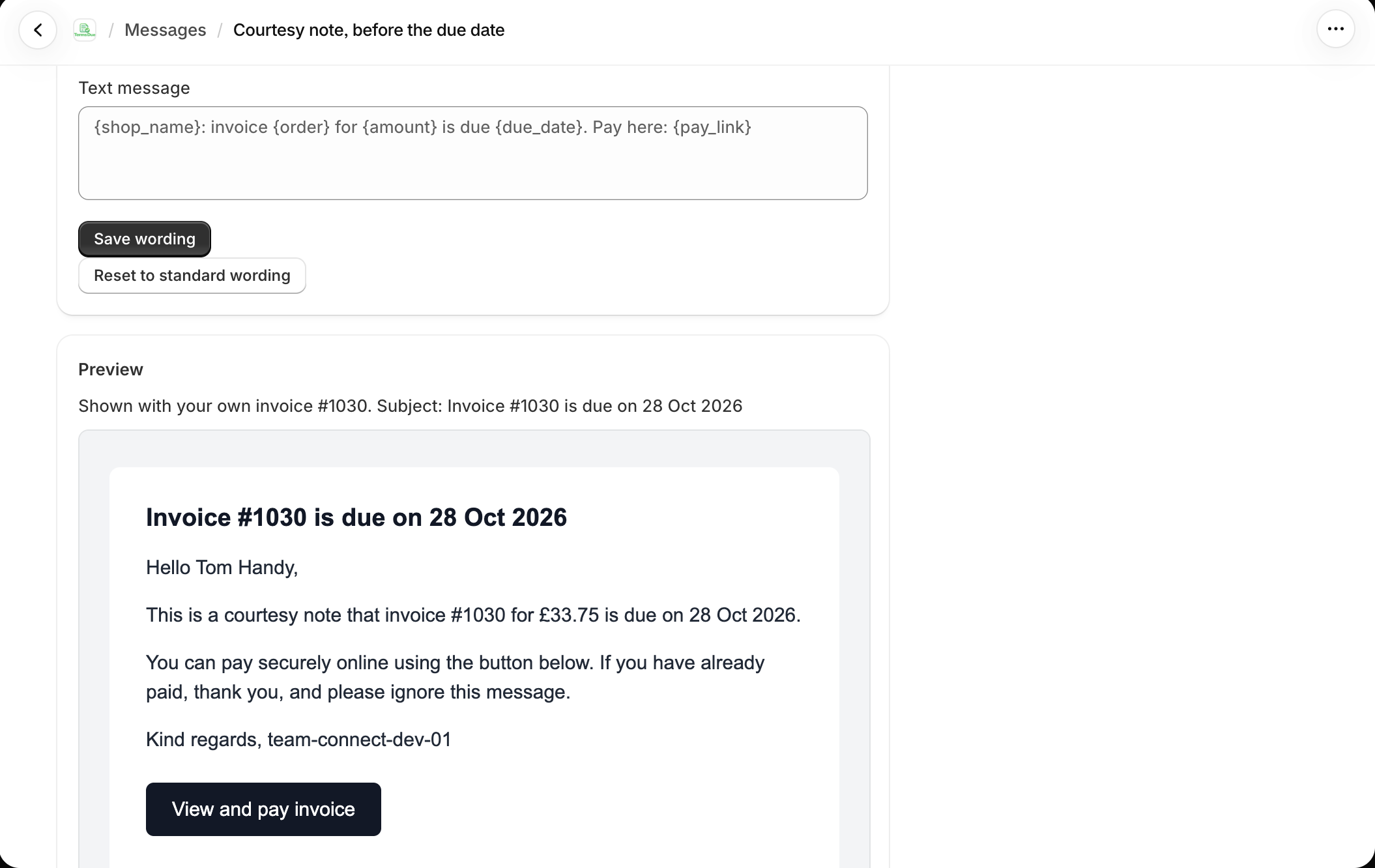
Preview with a real invoice
The editor renders your wording with one of your own invoices, so you see exactly what the buyer gets: subject line, your logo, the amount and date filled in, and the pay button. Send yourself a test before you save.
What the buyer sees
Emails and texts come from your store name, with your logo and your reply-to address. Every message carries the invoice number, the amount, the due date and a pay link. The pay-now page shows the buyer every open invoice, their credit limit and available credit, and lets them pay one or all by card through your Shopify checkout.
If they try to order while on hold, checkout tells them plainly: the account has an overdue balance, here is the amount, here is where to pay. There is no Terms Due branding anywhere a buyer looks.
What you see
The Overview shows what you are owed, how much is overdue, how your buyers are paying this quarter against last, and an attention list of the accounts that need a decision: over limit, newly on hold, a failed charge, a reply from a buyer. Below it, the aging report by buyer and what is due in the next seven days.
Every company has a page with its limit, balance, open invoices and a timeline of every reminder, hold, charge and payment. Every invoice has the same. The Monday email carries the headline numbers to whoever should see them.
The screens you work in
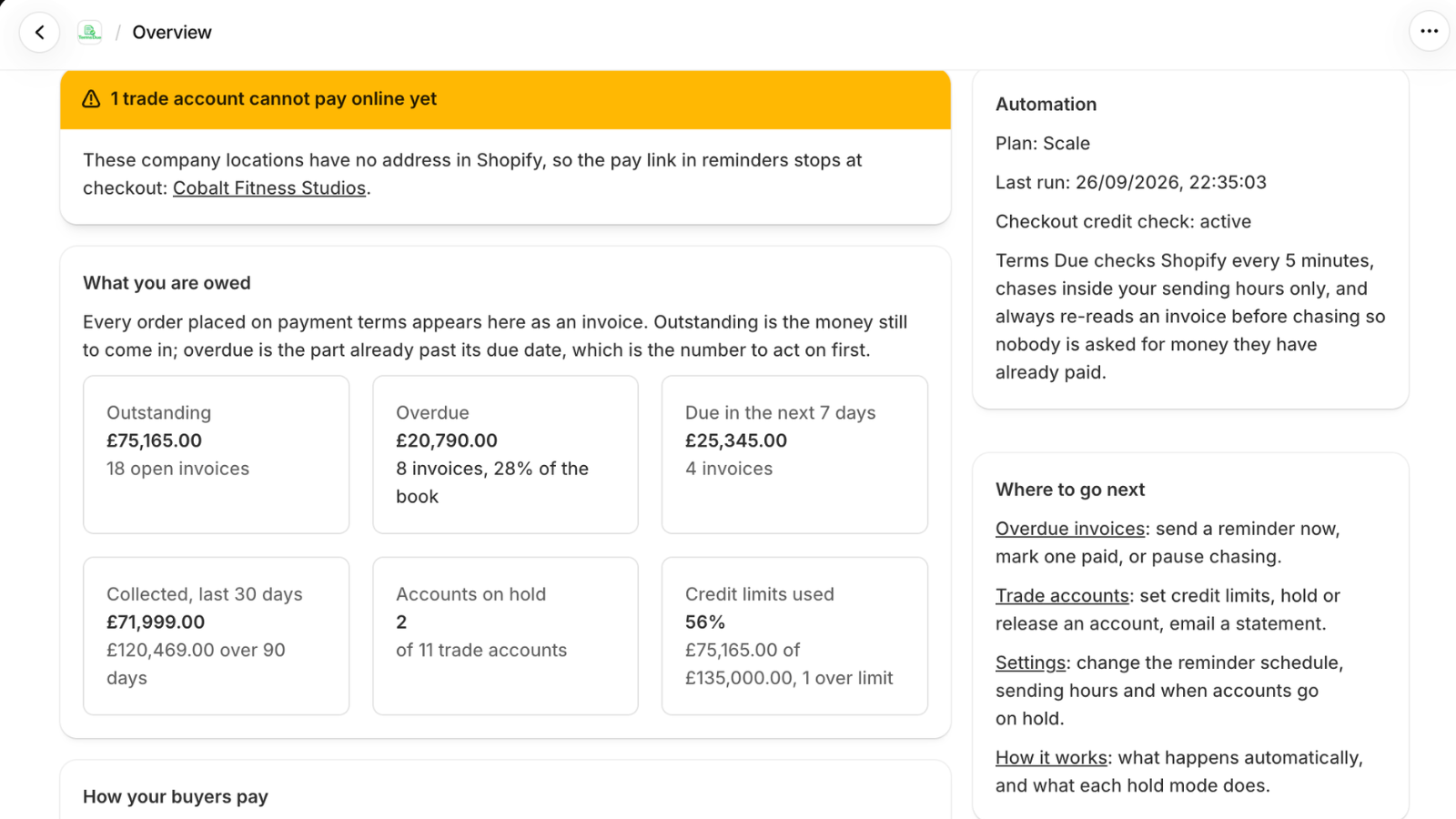
Overview
Outstanding, overdue, due in the next seven days, collected in the last 30 days, accounts on hold and credit limits used. The panel on the right confirms the automation ran, when, and that the checkout credit check is active.
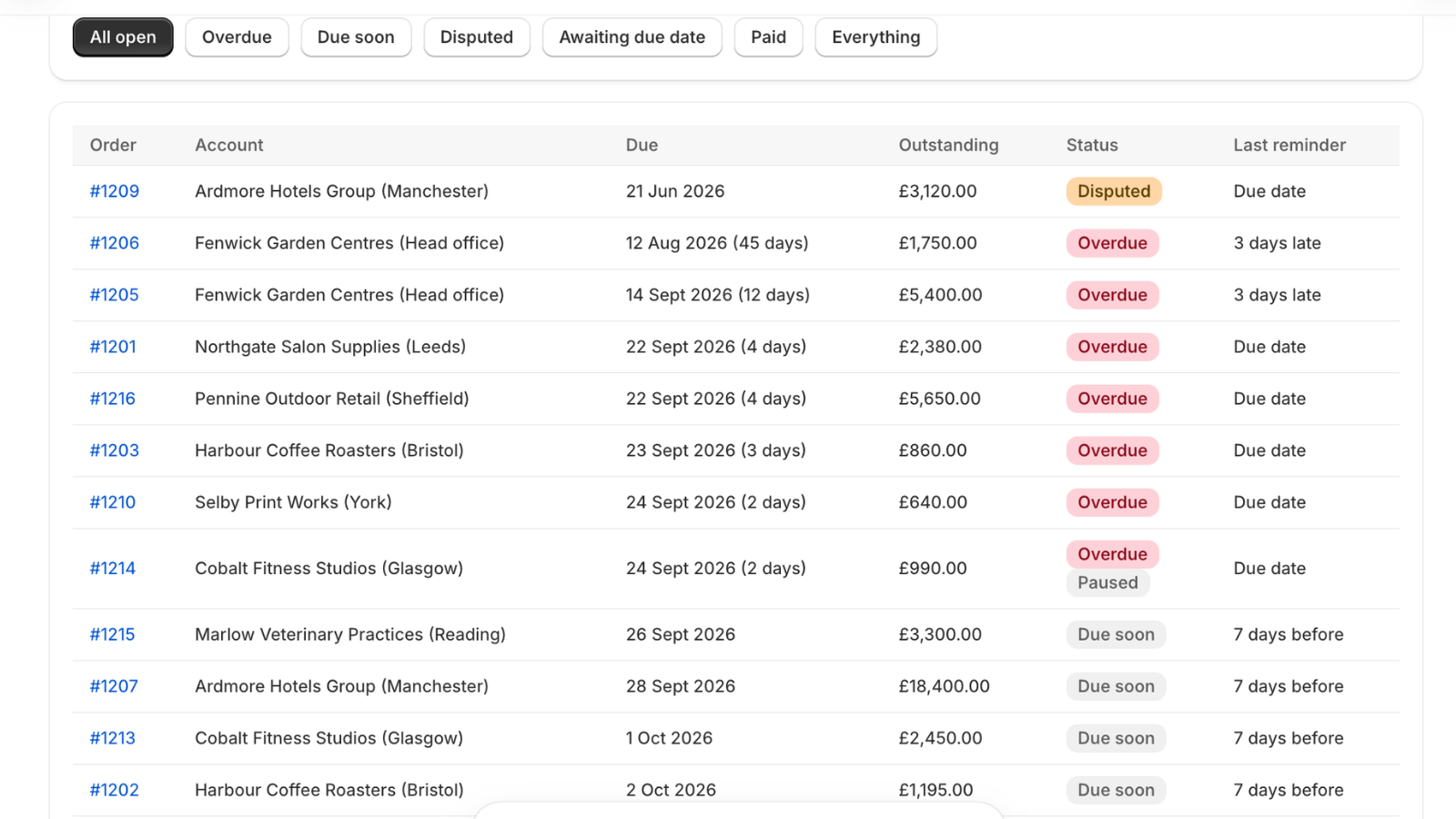
Invoices
One row per order on terms with its due date, days late, outstanding amount, status and the last reminder sent. A disputed invoice is paused; a paused account shows as such. Open any row to send a reminder now, mark it paid or pause chasing.
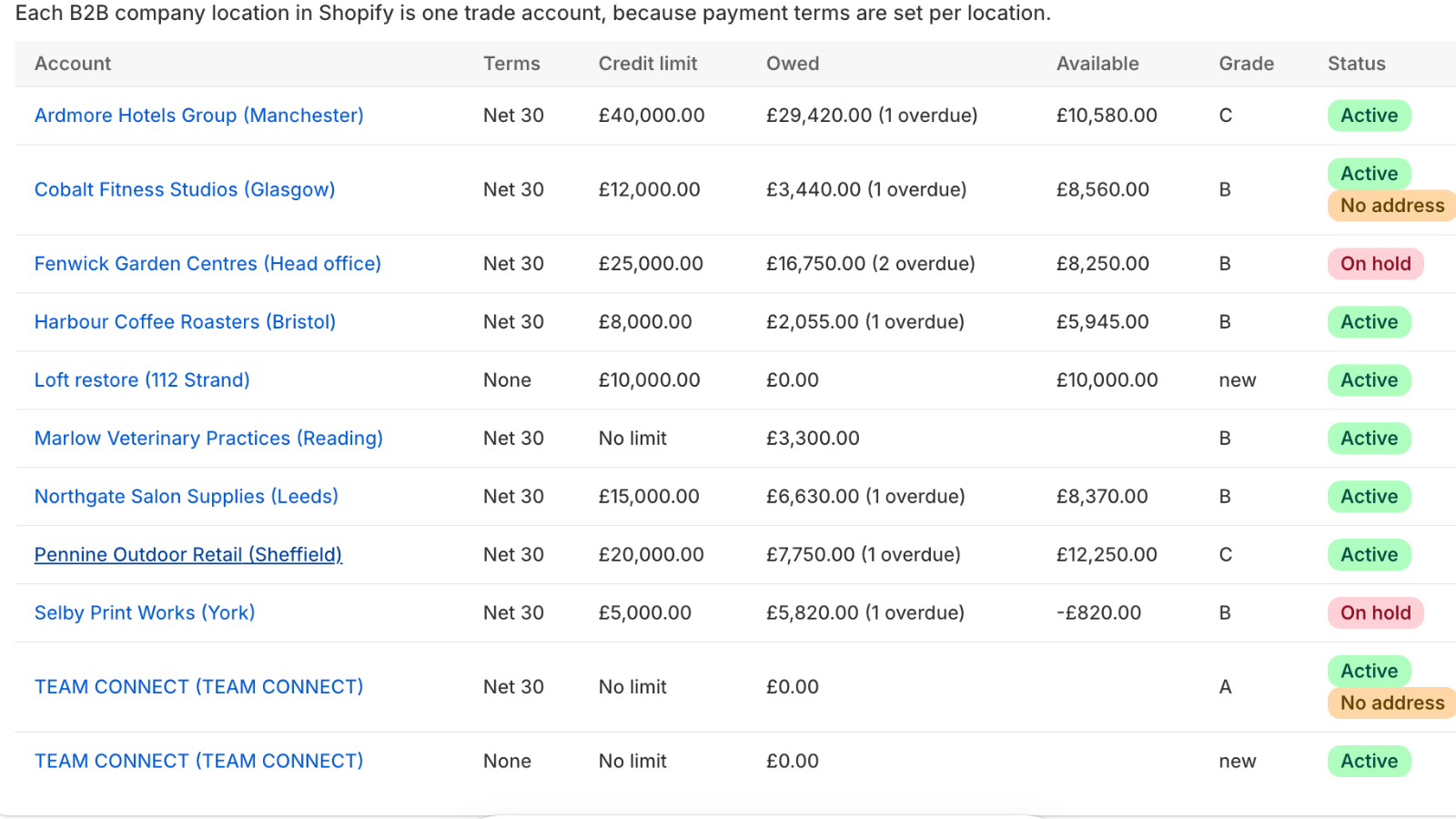
Trade accounts
Each company location with its terms, limit, balance, available credit, a grade earned from payment history and its status: active, on hold, or missing an address so the pay link cannot complete checkout. Set limits, hold or release, and email a statement from here.
Settings at a glance
The defaults when you install. Everything can be changed in Settings or per company.
| Setting | Default | Where to change it |
|---|---|---|
| Default credit limit for new companies | You choose on install | Settings |
| Limit type | Hard block | Per company |
| Hold when overdue by | 14 days | Settings, per company |
| Reminder schedule | Email -5; email and text 0, 7, 14, 30 | Settings |
| Reminder wording | Default templates | Messages |
| Due-date collection | Off until you turn it on | Settings, per company |
| Statements | Monthly on the 1st | Settings, per company |
| UK late payment interest | Off | Settings, per company |
| Monday digest | On, to the store owner | Settings |
What stays in Shopify
Companies, locations, catalogs, prices and payment terms are still managed in Shopify admin. Terms Due reads them and never changes your prices or catalogs.
Payments are recorded against the Shopify order, so your order list, reports and accounting app integration keep working as they do today. Uninstall the app and nothing in Shopify is different; you are simply back to chasing by hand.
Data and security
Terms Due stores the minimum it needs to run: your companies, contacts, orders on terms, payment status and your settings, in Google Cloud's London region. Card details are never seen or stored; Shopify vaults them and Terms Due asks Shopify to charge them. Access is through your Shopify login. On uninstall, store data is deleted within 30 days. The privacy policy has the detail.
Questions
What happens if a saved card charge fails?
The buyer gets an email and text asking them to pay on the pay-now page or update their card, and the invoice follows your normal overdue schedule.
Can I approve a held order manually?
Yes. You can release a hold for a single order or lift it for the whole company for a set number of days.
Does it work with invoices paid by bank transfer?
Yes. Mark the order as paid in Shopify as you do now and Terms Due updates the balance and stops reminders.
How quickly does Terms Due see a new order?
Within seconds. Shopify notifies the app when an order on terms is placed, paid, cancelled or refunded.
Does the app need access to my whole store?
It needs to read companies, orders and payment terms, write payments back to orders, and run a checkout rule. It does not touch products, prices, themes or retail customers.
Can more than one person use it?
Anyone with access to your Shopify admin can open the app. The Monday email can go to several addresses.
Related
Credit holds
Put Shopify B2B companies on credit hold automatically when an invoice is overdue or they pass their limit. New orders are blocked at checkout until they pay.
Read moreDue-date collection
Collect Shopify B2B net terms invoices automatically by charging the buyer's saved card on the due date, with advance notice and automatic retries.
Read moreEmail and text reminders
Send automatic email and text reminders for Shopify B2B invoices before and after the due date, with a one-tap pay link and firmer wording as invoices age.
Read moreStop chasing wholesale invoices by hand
Install Terms Due, set a credit limit for each buyer and let the app hold, remind and collect.
Install on Shopify